Add a unit
Bring a new portable sanitation unit into your inventory.
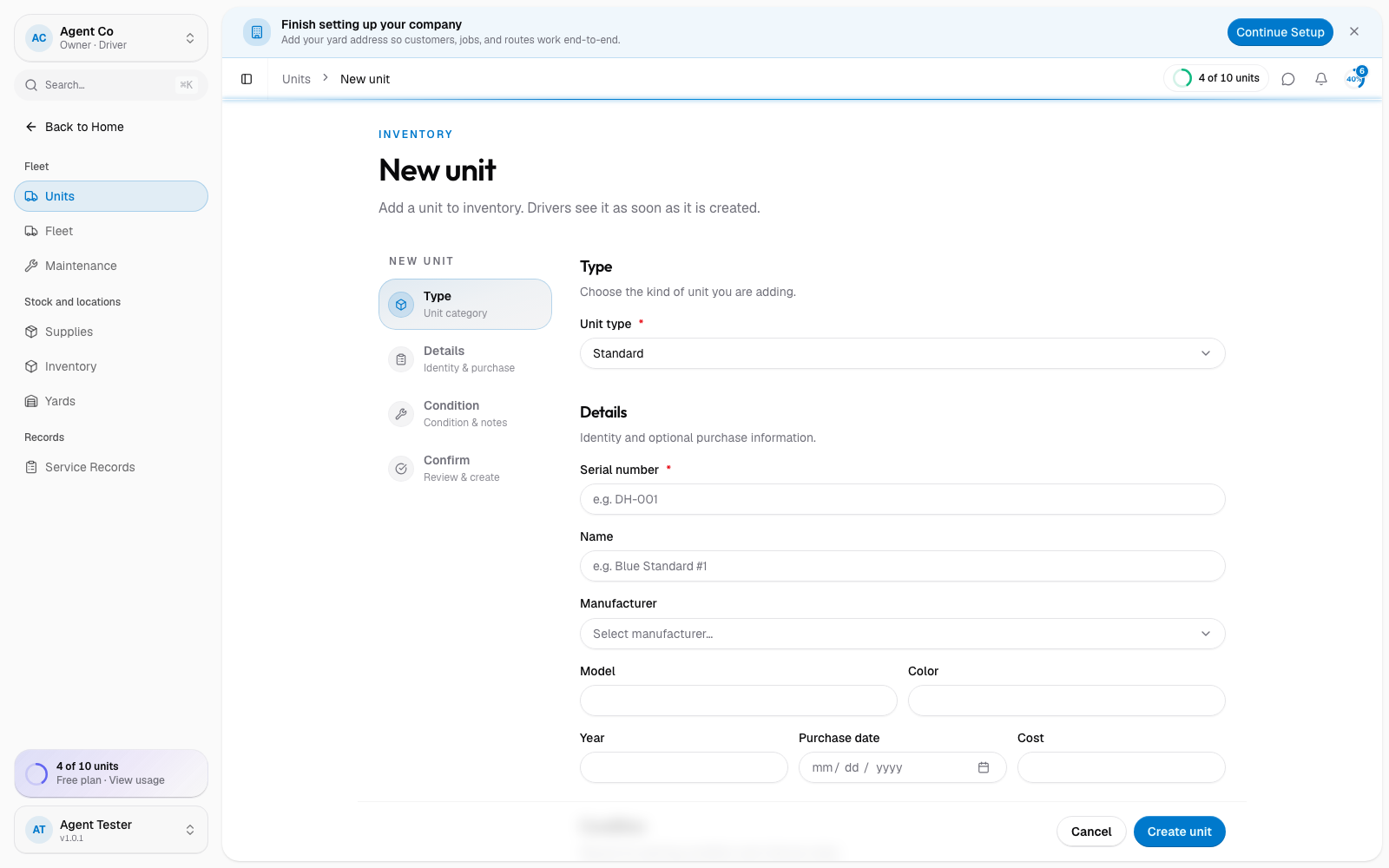
Go to Units in the sidebar, then select Add Unit.
Pick the Unit type: Standard, ADA, Handwash, Flush, or Holding Tank.
Add the Serial number (for example DH-001). This is required and
should match the number on the unit itself.
Optionally add a Name (for example "Blue Standard #1"), Manufacturer, Model, Color, Year, Purchase date, and Cost.
Pick the Condition: Excellent, Good, Fair, or Poor.
Add any Notes, then select Create unit.
What you'll see
The new unit starts in the In Yard status. Drivers can see it as soon as you create it. From the unit's page you can generate a QR code, upload photos, and start a work order later.
If you're adding several units at once, you don't need to fill in every field. Serial number, type, and condition are the only ones that are required.
If something's not right
- Add Unit is greyed out: your plan may have reached its unit limit. Check Settings → Billing and your plan.
- Serial number rejected: another unit already uses it. Serial numbers must be unique.
- Wrong manufacturer in the list: pick Other and add the real name in Notes.