Dispatch
Job statuses and what drivers see
What each job status means and how a driver moves a job forward.
Every job moves through the same statuses:
- Pending: created, not yet on a driver's schedule.
- Assigned: on a driver's schedule, not started.
- In Progress: the driver has started the job.
- Completed: the driver finished the job.
- Cancelled: the job won't happen.
What you'll see
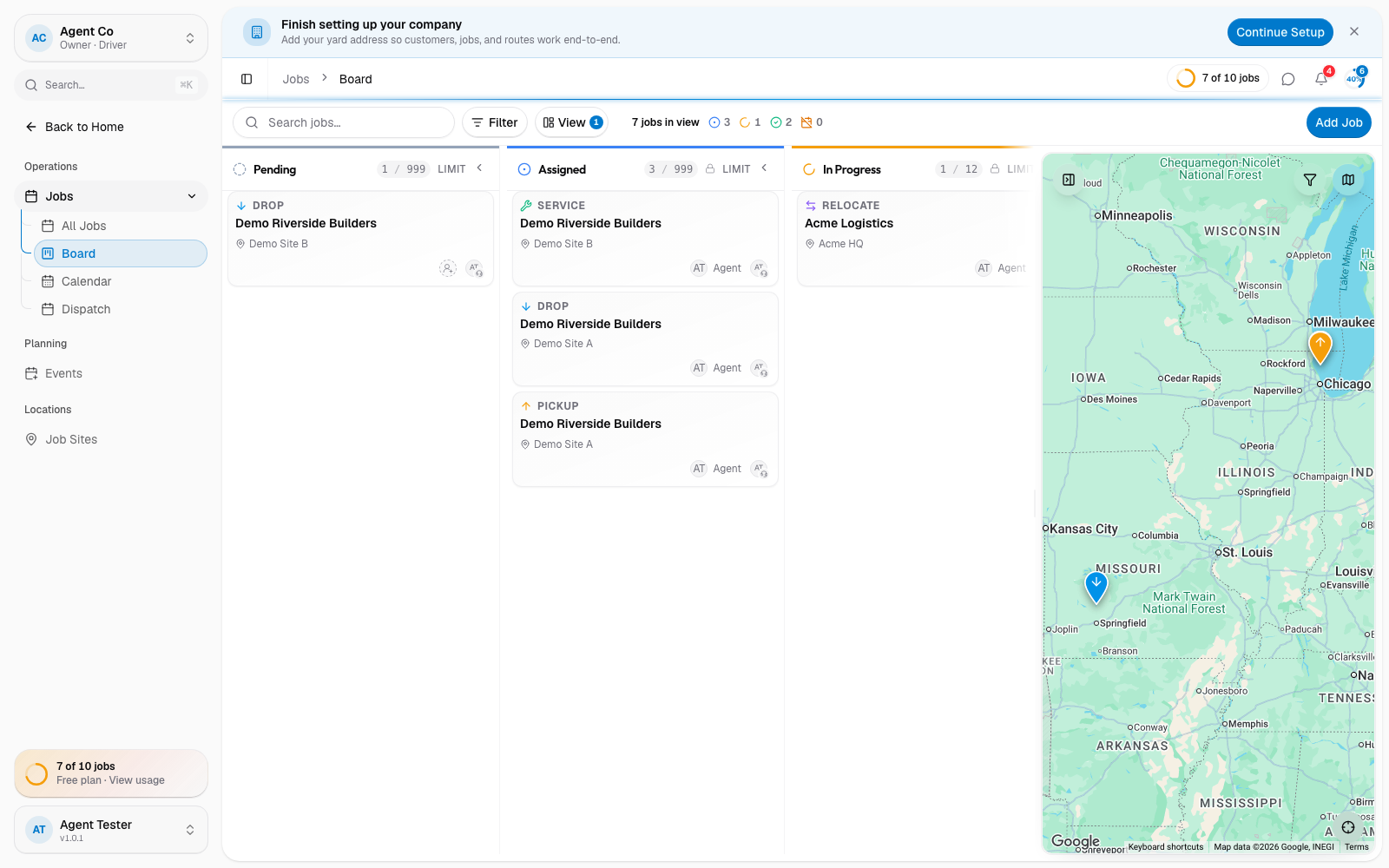
The Board view lays jobs out as columns by status, so you can see everything Pending, Assigned, In Progress, Completed, or Cancelled at a glance.
What drivers see
On their phone, a driver sees one action button per job that matches its current status:
- Pending → Assign Job (moves the job to Assigned; it doesn't choose or change who the job is assigned to)
- Assigned → Start Job (moves it to In Progress)
- In Progress → Complete Job (moves it to Completed)
In the driver app, a driver can only cancel a job while it's Pending or Assigned, not once they've started it. Dispatchers on the web have no such limit: they can cancel a job from any status.
If something's not right
- A job is stuck In Progress: the driver hasn't tapped Complete Job yet. Check with them directly.
- A driver can't cancel a job: it's already In Progress or Completed, so the driver app blocks it. Cancel the job from the web instead.